


SITREP
3.135.00 Reviews
App Specs
- Version
- 1.0.5
- Updated On
- License
- Free
- Downloads
- 10,000+
- Developer
- Artorias, Inc.
- Categories
- News & Magazines
- Platform
- Android
Screenshots
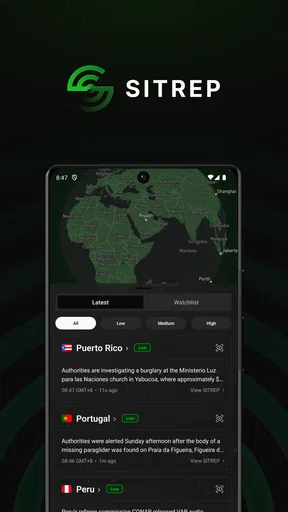
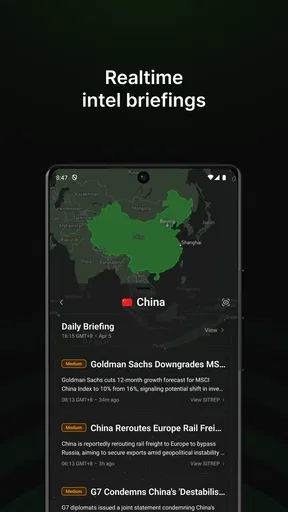
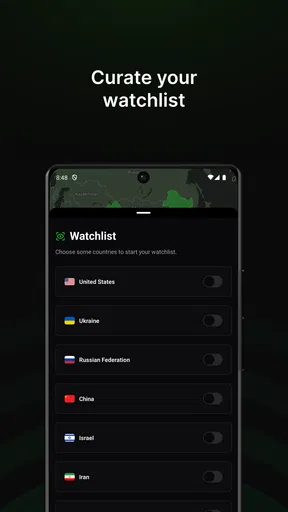
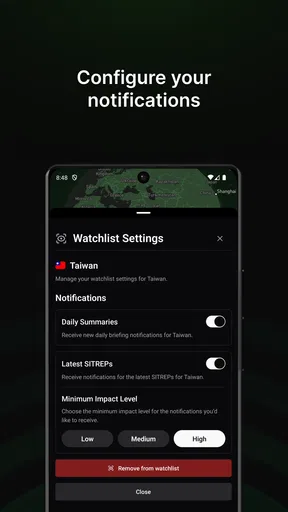
 Analysis by AppCompare
When I first tried SITREP, I was looking for a quicker way to keep track of changing information rather than another place to build a long to-do list. Its appeal is immediate: it presents itself as a news and magazines app focused on timely awareness, so the value is less about organizing every task in my life and more about deciding what deserves my attention now. That distinction matters once the first-week novelty wears off.
The first week: a useful change of perspective
In its first few days, an app centered on current information can feel refreshing simply because it encourages a different habit: checking for developments instead of waiting for a scheduled news roundup. I would use it when a developing story could affect plans, when I want a quick check before a commute, or when I need a focused moment to catch up without opening several general news sources. The practical test is whether those checks help me make a decision, not whether the feed keeps me browsing.
For example, imagine that I have an appointment across town and hear that conditions may be changing in the area. A quick look at a timely-information app can help me decide whether to leave earlier or check again before setting out. I would still confirm important details through an authoritative source, but the app can serve as an early prompt to pay attention. That is a more realistic role for a news tool than expecting it to replace every source I rely on.
What it is, and what it is not
The name suggests a concise situation report, and the store summary points to global intelligence and alerts. I read that as a promise of awareness and timely updates, not as a claim that it is a task manager, calendar, or personal assistant. That difference is important because expectations shape whether the app feels useful: someone seeking a place to manage assignments should choose a dedicated planner, while someone who wants to keep an eye on developing information may find the idea more relevant.
It sits in the broad News & Magazines space, but its alert-oriented angle gives it a different job from a newspaper app built around articles and editions. A conventional news reader is often better when I want depth, familiar sections, or a relaxing browse. A general search engine is usually better when I already know exactly what question I need answered. SITREP makes more sense as a check-in point when I want to notice what is changing, then follow up elsewhere when a detail matters.
Month-to-month value depends on a clear routine
For lasting use, I would give it a specific place in the day instead of checking whenever I have a spare second. A morning scan before leaving home and a later check when plans may have shifted is more purposeful than turning every quiet moment into another refresh. That approach also gives me a fair way to judge whether the app is earning space on my phone: after a few weeks, can I name a decision or useful piece of awareness it helped me reach?
One non-obvious trade-off with any real-time alert tool is that speed and context are not the same thing. A fresh update can tell me that something is developing without answering what it means for my situation. I would treat an alert as a cue to investigate, not as a complete explanation or a substitute for checking the original reporting. This is especially useful when a headline could affect travel, work, or a conversation with family; pause long enough to verify what applies to you before acting.
Worth Reading Before You Choose

Flipboard Shows What News Apps Must Do Beyond the Feed

Switching to Android Auto Means Rethinking Your Driving Routine

Google Calendar Makes a Crowded Week Easier to Manage

Ludo King Makes the Most of the Minutes Between Plans

Baby Panda World Brings Quick Play to Modern Phones, but Its Game Library Feels Busy

ESPN’s Live Game View Makes Following Close Games Easier
Maintenance: keep the habit lighter than the feed
The ongoing effort should be less about managing a complicated setup and more about deciding how much attention I want to give the app. If notifications begin to interrupt focused work, I would reduce or disable them and make deliberate check-ins instead. If I rarely open it, I would ask whether the information is too broad for my needs or whether I simply do not have a recurring reason to use it. A useful tool should fit a routine, not demand that I invent one.
I would also avoid treating every update as something that needs to be saved, shared, or acted on. That can turn awareness into a second inbox. A better workflow is to scan, identify anything that changes a real decision, and then move to a more suitable source for detail. For instance, a person following a developing public issue could use SITREP to notice that attention is warranted, then read a full report from a trusted outlet before drawing conclusions. This keeps the app’s role narrow and makes repeat visits easier to justify.
Who will get the most from it
I can see it working best for readers who follow events as they unfold and prefer a prompt to check in rather than relying on a single daily newspaper visit. It may also suit someone whose schedule changes in response to current conditions, provided they understand that an alert is a starting point and not a guarantee of complete, personalized guidance. The useful question is not simply whether a person likes news; it is whether timely awareness changes what they do.
On the other hand, I would skip it if I mainly want long-form journalism, a carefully curated reading list, or a planner for deadlines and reminders. A familiar news publication may offer a more comfortable experience for deep reading, while a dedicated task app is more appropriate for tracking responsibilities. If notifications make you anxious or you tend to check headlines compulsively, an app focused on real-time updates may add noise rather than value. In that case, a scheduled news digest or a couple of trusted sources checked at set times could be a healthier fit.
How the app earns trust over time
When I judge a news-oriented tool, I look beyond whether it feels polished in a short session. I want to know whether its updates are understandable, whether the timing is useful, and whether I can tell when I need more context. Those are habits worth checking as you use it: notice whether an alert leads to a clear next step, whether you keep seeing items that matter to your interests, and whether the app leaves you better informed rather than merely more stimulated.
There is also a practical distinction between a broad global perspective and local usefulness. A worldwide update can be important without changing what I need to do today. I would therefore compare what I see in the app with the decisions I actually make, rather than assuming that a large scope automatically means personal relevance. If local details are essential, I would confirm them with a local source. If the app routinely sends me toward information that does not affect my interests, that is a sign to reconsider how often I use it.
Cost, compatibility, and what to check
The app is free to download, with in-app purchases listed at $9.99 per item. I would start by using the free experience to decide whether its style of updates fits my routine before considering a purchase. The price of an item alone does not tell me whether it is worthwhile; I would check what that specific purchase offers and whether it solves a problem I actually have. It is rated for Everyone, which describes its content rating, not a promise that every alert will suit every reader.
Its developer is Artorias, Inc., and the app is at version 1.0.5. It was released on April 6, 2025, and requires operating system 11 or later. Before installing, I would check that my device meets that requirement and consider whether I am comfortable with the app’s approach to alerts. Its average rating is 3.0 from 112 ratings, alongside 34 written reviews and over 10,000 installs. I would treat those figures as a reason to read recent user feedback with care, not as a substitute for testing whether the app works for my own use.
Where it fits beside everyday alternatives
Compared with a standard news app, SITREP’s strongest case is the idea of staying aware of developments rather than settling in for a long read. Compared with checking a search engine repeatedly, it may be a more convenient starting point when I do not yet know what to look for. But those comparisons cut both ways: a traditional outlet may explain a story more fully, and search is more direct when I need a precise answer. I would use each for its natural purpose instead of expecting one app to do all three jobs.
A useful personal test is to keep the app in my routine for a short trial and note, mentally or in a simple note, the moments when it changed what I checked or did. If the only effect is that I opened my phone more often, the habit is not paying for itself. If it helps me notice a relevant development early and then verify it efficiently, it has a clearer role. This test avoids confusing frequent use with genuine usefulness.
What Exactly Is SITREP?
Picture this: a blend of task management and real-time updates. That’s what SITREP promises, and boy, does it deliver. It’s not just another task app; it’s more like having your personal assistant who keeps you updated on everything you need to know. The app is designed to provide situational reports—hence the name—and it does so with style.
Getting Started with SITREP
Installing SITREP was a breeze, available on both Android and iOS, so no worries about compatibility here. After a quick download, I was up and running. The initial setup was straightforward; it asked for the usual permissions—notifications, calendar access, you know the drill. Once I got past that, I was greeted with a clean and intuitive user interface. Even my grandma could navigate this, and she still struggles with her smartphone.
Features That Stand Out
Now, let’s talk features. The beauty of SITREP lies in its simplicity and efficiency. You can create tasks, set reminders, and even get updates on ongoing projects. The app allows you to categorize your tasks, which is a lifesaver if you’re juggling multiple projects like me. One feature I found particularly neat is the ‘Update Me’ option. With a simple tap, you get a quick overview of your day, including any changes or updates to your tasks.
The app also integrates seamlessly with other apps. Whether it’s pulling in calendar events or syncing with your email for those important updates, SITREP has your back. It’s like having everything in one place without the chaos.
The User Experience
Using SITREP feels like having a personal assistant in your pocket. The notifications are non-intrusive, and you can customize them to your liking. Got a busy day ahead? Set your updates to hourly. Want to check in less frequently? No problem, adjust it to your preference. The flexibility here is just one of the many things I love about this app.
Moreover, the app runs smoothly without any hiccups. I’ve been using it on my relatively old Android device, and it hasn’t crashed once. That’s saying something, considering how resource-hungry some apps can be.
Why You’ll Love SITREP
Alright, here’s where I get a bit personal. I’m a sucker for apps that make my life easier, and SITREP does just that. The way it consolidates information and keeps me updated without overwhelming me is a game-changer. It’s perfect for anyone who needs to manage their time efficiently—whether you’re a busy professional or a student trying to keep track of assignments.
Another thing worth mentioning is the app’s design. It’s sleek, modern, and doesn’t bombard you with unnecessary features. Everything is where it should be, making the whole experience seamless and enjoyable.
Wrapping It Up
To sum it up, SITREP is one of those apps that just works. It’s practical, user-friendly, and genuinely helpful in managing your daily tasks and updates. If you’re like me, always on the lookout for tools that simplify life, this app is definitely worth a try.
So, why not give it a shot? You might just find it’s the missing piece in your productivity puzzle. Happy organizing!
My long-term verdict
My lasting recommendation comes with an important condition: I would keep SITREP only if its updates regularly help me notice something that matters. The first-week appeal of checking a new source is easy to mistake for durable value, so I would judge it by whether it still has a clear purpose once the novelty fades. A brief, intentional check can be worthwhile; constant monitoring without a useful outcome is not.
There is a mismatch between the app’s news-and-alert identity and the older description of task lists, calendars, and email integration in the app’s presentation. I would not assume those productivity functions are the reason to install it or build a routine around them without checking what is currently available on my device. For a reader choosing a news app, the sensible approach is to focus on the timely-awareness role and verify important details through reliable reporting. For someone who wants a proven system for projects and reminders, a dedicated organizer remains the safer choice.
Overall, I would give it a try if I wanted a compact way to keep an eye on developing information and was willing to manage my attention deliberately. I would pass if I wanted deep reading, a fully dependable local guide, or one tool that replaces a planner and several news sources. Its value is not simply that it can bring updates to my screen; it is whether I can turn those updates into better-informed choices without letting them take over my day.
Pros
- Intuitive user interface makes navigation easy.
- Comprehensive data for situational awareness.
- Real-time updates keep information current.
- Customizable alerts for specific events.
- Offline access for critical information.
Cons
- Limited device compatibility for older models.
- Occasional lag in data syncing.
- Requires internet for full functionality.
- Battery consumption can be high.
- Complex setup for inexperienced users.
FAQs for SITREP
What is SITREP and what does it do?
SITREP is a versatile application designed for real-time situation reporting and communication. It allows users to share updates, images, and location data efficiently. Ideal for teams needing quick information exchange, it enhances coordination in fields like emergency services, event management, and security operations, providing a comprehensive overview of ongoing situations.
Is SITREP available on both Android and iOS devices?
Yes, SITREP is available for download on both Android and iOS platforms. The app is designed to function seamlessly across different devices, ensuring that users can access its features regardless of their preferred operating system. Links for downloading SITREP can be found on the respective app stores.
Does SITREP require an internet connection to function?
While SITREP's core functionalities, like real-time updates and data sharing, require an internet connection, some features may be accessible offline. For full utilization, including live location tracking and instant communication, a stable internet connection is recommended to ensure optimal performance.
How secure is the data shared on SITREP?
SITREP prioritizes user data security by implementing strong encryption protocols to protect information shared through the app. It complies with industry standards for data protection, ensuring that sensitive information remains confidential and secure from unauthorized access during transmission and storage.
Can SITREP be used for personal purposes, or is it strictly for professional use?
SITREP is versatile enough for both personal and professional use. While it is designed with features that benefit professional teams, such as in emergency management and event coordination, individuals can also utilize it for personal projects, travel planning, or any scenario where organized communication and real-time updates are beneficial.


